Setting up a VI voucher type: accounts and e-mails
This guide explains how to prepare a voucher type (introductory flight, discovery day…) so that it is correctly accounted for and the buyer receives the right e-mails at the right time, with their booking link. Do it once, before selling or importing vouchers.
Where: VI & HelloAsso › Types VI. Right: Manage vouchers and VI types. For the accounting entries afterwards, see Trial flights.
Example followed in this guide: the VI type "Introductory flight" at €125, sold on HelloAsso and at the club.
Two independent settings
The accounts decide where the entries go. The e-mails decide what the buyer receives. You can set one without the other, but a type without accounts can be neither collected nor billed correctly.
A. The type's accounts
In the list of types, open the type's Accounting icon. The panel follows the four stages of a voucher's life.
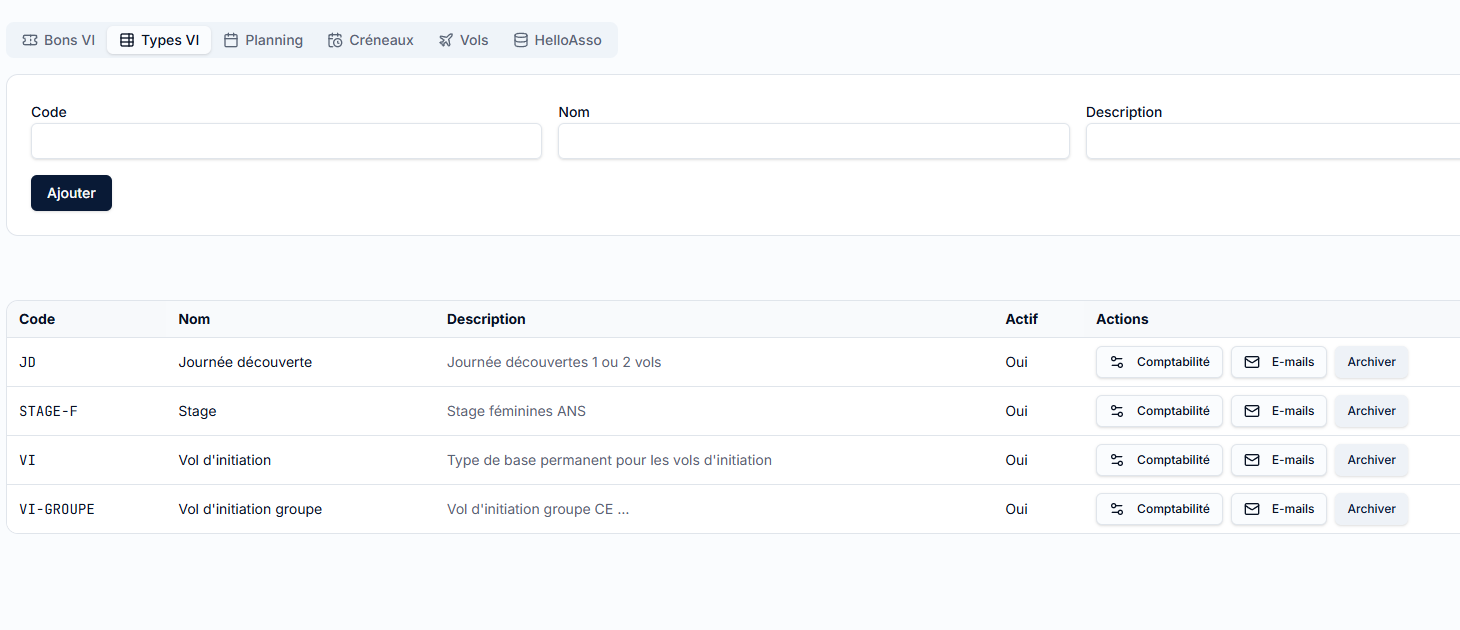
| Field | Role | Typical value |
|---|---|---|
| VI advances account | Credited at purchase: the money received is an advance, not yet a sale | 419100 |
| Flight revenue account | Credited at completion: the flight is done, the sale becomes final | 7067 |
| Insurance revenue account | Receives the insurance share of the price (so flight revenue does not include it) | 70692 |
| Insurance supplier account | Debt to the federation for insurance | 401 |
| Insurance third party | The federal supplier (FO-… record in the Third parties module) |
FFVP |
| Insurance expense account | Insurance expense, offset by the insurance revenue | 6169 |
| Insurance amount (€ / flight) | Insurance share per person (once per person) | 15 |
| Analytical accounts cost / reflection | Analytical posting of the flight billing (class 9) | 921 / 902 |
| Max flights per voucher | Number of flights the voucher can receive | 2 for VI and JD |
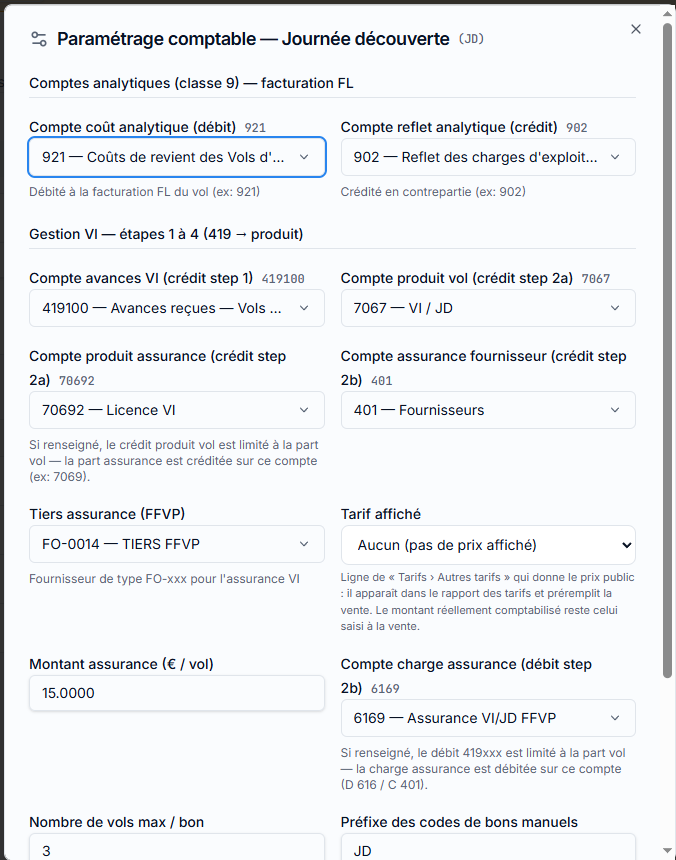
Two more settings on the type:
- Prefix of manual voucher codes: a hand-entered voucher gets the code
PREFIX-YYYY-NNNN(VI-2026-0007). TheHA-prefix is reserved for HelloAsso. - Purchase entry required: if ticked, a voucher without a payment entry is flagged "No purchase entry" (except HelloAsso, gifted or cancelled vouchers). Untick when the purchase is booked another way.
Both analytical accounts are mandatory
Without them, billing the introductory flight is refused ("initiation_billing_unresolved"): the flight is never billed to the pilot. Check them before the first season.
You should see: after Save, the message "Saved". The entries generated afterwards (VI-ENC-… at purchase, VI-REAL-… at completion) use these accounts.
B. Online booking: the "slot type"
A voucher type is tied to a slot type:
| Voucher type | Booked in a slot… | Length suggested when opening |
|---|---|---|
Introductory flight (VI) |
VI | 3 h |
Discovery day (JD) |
JD (the whole day) | 8 h |
| Groups, courses, other types | none: the club plans them itself | — |
The application sets this link. A voucher of another type does not offer a booking link to the buyer; the club places it by hand (see VI booking slots).
C. The type's e-mails
In the list of types, open the E-mails icon. Three messages are each set with a mode:
| Mode | Effect |
|---|---|
| No e-mail | Nothing is sent, no button |
| Manual | The club sends it from the envelope in the voucher list |
| Automatic | Sent on its own at the right time (not available for the booking reminder) |
| Message | When | Recommended mode |
|---|---|---|
| Instructions ("purchase e-mail") | When the voucher is created; for HelloAsso, when the purchase is converted to a voucher | Automatic |
| Reminder | When the voucher gets its date (booking confirmed or placed by the club); sent again if the date changes | Automatic |
| Booking reminder | By hand, or in bulk, for a voucher that has no date yet | Manual |
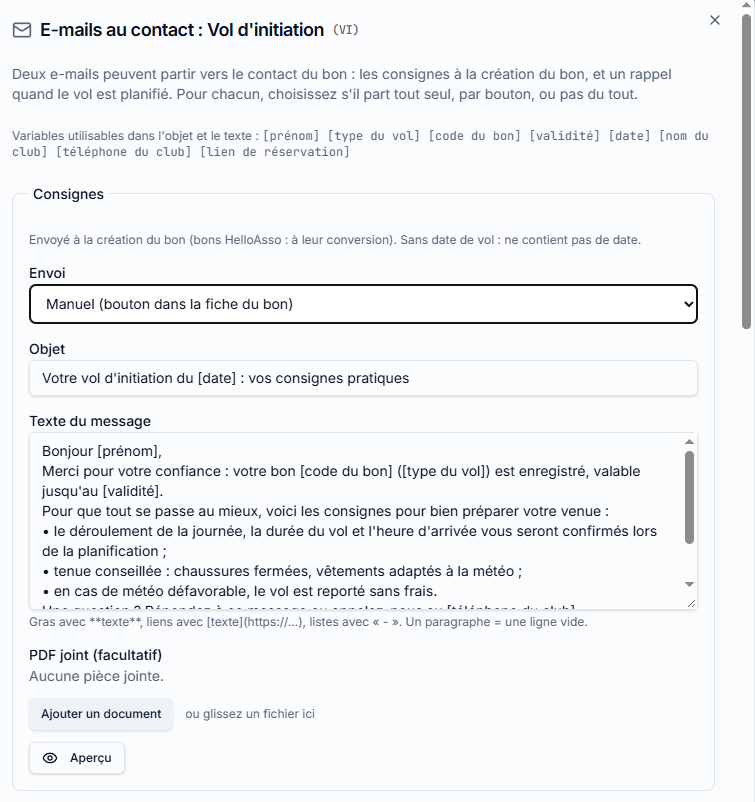
Variables
Type them as they are in the subject and the text; they are replaced with the voucher's values.
| Variable | Replaced by |
|---|---|
[prénom] |
Contact's first name (empty if unknown) |
[type du vol] |
Type name ("Introductory flight") |
[code du bon] |
Voucher code |
[validité] |
Deadline, for example "Saturday 30 June 2027" |
[date] |
Flight date (empty until the voucher is planned) |
[nom du club], [téléphone du club] |
The club's general settings |
[lien de réservation] |
The buyer's personal link |
The formatting is deliberately simple: **bold**, *italic*, [link text](https://…), lists with -, one paragraph = one blank line. A PDF can be attached to each message (access map, information sheet).
The booking link is the same in every e-mail of a voucher
Put [lien de réservation] in the instructions and in the booking reminder. The "Send the link to existing vouchers" button on the slots screen requires the message to contain this variable.
Example texts
These are templates to adapt (place, times, the club's weight limits). The variables are written in French, as the application expects.
1. Instructions: sent at purchase, with the link
Subject:
[nom du club] : votre bon de vol d'initiation [code du bon]Bonjour [prénom],
Merci pour votre achat ! Votre [type du vol] est prêt. Code du bon : [code du bon], valable jusqu'au [validité].
Choisissez votre date vous-même, en quelques clics et sans créer de compte :
[Réserver mon vol]([lien de réservation])Ce lien est personnel : ne le transmettez pas. Il vous permet aussi de consulter ou d'annuler votre réservation.
Avant le vol - Prévoyez des chaussures fermées et une tenue adaptée à la météo. - Le poids maximal est de 100 kg ; prévenez-nous en cas de doute ou de souci de santé. - Les vols dépendent de la météo : nous vous proposerons une autre date si nécessaire, votre bon reste valable.
Une question ? Appelez-nous au [téléphone du club].
À bientôt, [nom du club]
(In English: thanks for the purchase; here is your code and deadline; choose your date yourself with the personal link, which you must not share; what to bring; weight limit; weather may postpone, the voucher stays valid; phone number.) Write the text in the language of your buyers.
2. Reminder: sent when the date is set
Subject:
[nom du club] : votre vol d'initiation est confirmé le [date]Bonjour [prénom],
Votre vol est confirmé pour le [date]. Le rendez-vous précis vous est communiqué par le club ; en cas d'empêchement, prévenez-nous au plus vite au [téléphone du club].
Pour consulter ou annuler votre réservation :
[votre réservation]([lien de réservation])Pensez à apporter une pièce d'identité. Bon vol !
Automatic reminder = no duplicate
When the reminder mode is Automatic, this message also acts as the confirmation: the application does not additionally send the standard confirmation. Write it as a confirmation. If the reminder is Manual or No e-mail, the standard confirmation (below) is sent instead.
3. Booking reminder: to invite a buyer who has no date yet
Subject:
[nom du club] : choisissez la date de votre volBonjour [prénom],
Vous avez un bon [type du vol] ([code du bon]) valable jusqu'au [validité], et nous n'avons pas encore de date pour votre vol.
Les prochaines places sont affichées ici :
[Choisir ma date]([lien de réservation])Besoin d'aide ? [téléphone du club].
Fixed automatic messages
Three messages cannot be edited: they are sent on their own when the club acts on a booking. They use the club name, the date and the personal link.
| Event | Text sent to the buyer (excerpt, in French) |
|---|---|
| Booking confirmed (if the reminder is not automatic) | "Votre réservation est confirmée pour le samedi 15 mai 2027. Les consignes et le lieu de rendez-vous vous ont été ou vous seront communiqués par le club…" + link to view or cancel |
| Request refused | "Nous n'avons malheureusement pas pu retenir votre demande pour le samedi 15 mai 2027 (créneau complet ou non maintenu)…" + link to choose another date |
| Slot cancelled | "Le créneau du samedi 15 mai 2027 est annulé. Votre bon reste valable et n'est pas consommé…" |
If sending fails, the club's action is never blocked: it is recorded and the error is only logged.
Preview and test
- In the E-mails panel, click Preview next to the message: the current text is saved, then shown with sample values (Camille,
VI-2026-0001, a fake link). Nothing is sent. - Read it, correct it, Save.
- For a real test, create a test voucher with your own address as the contact, then send it from the envelope in the voucher list (step D). Cancel it afterwards.
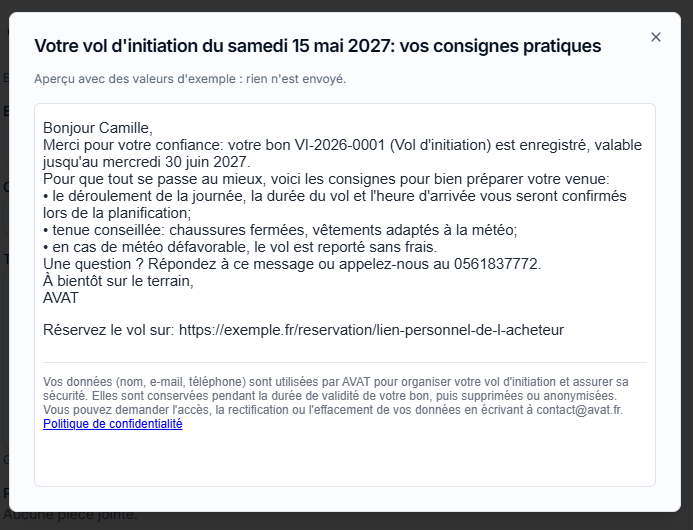
The GDPR notice is added automatically
A footer "your data is used by the club to organise your flight…" (with the link to the privacy policy from the general settings) is added to every e-mail. Do not copy it into the text. These are service messages: no commercial offers in them.
D. Sending or re-sending an e-mail to a voucher
- Bons VI, click the envelope on the voucher's row.
- In the "Voucher e-mails" window, choose the message and Send (or Resend; the date of the last sending is shown).
- For all vouchers already sold: Slots › Send the link to existing vouchers (see VI booking slots).
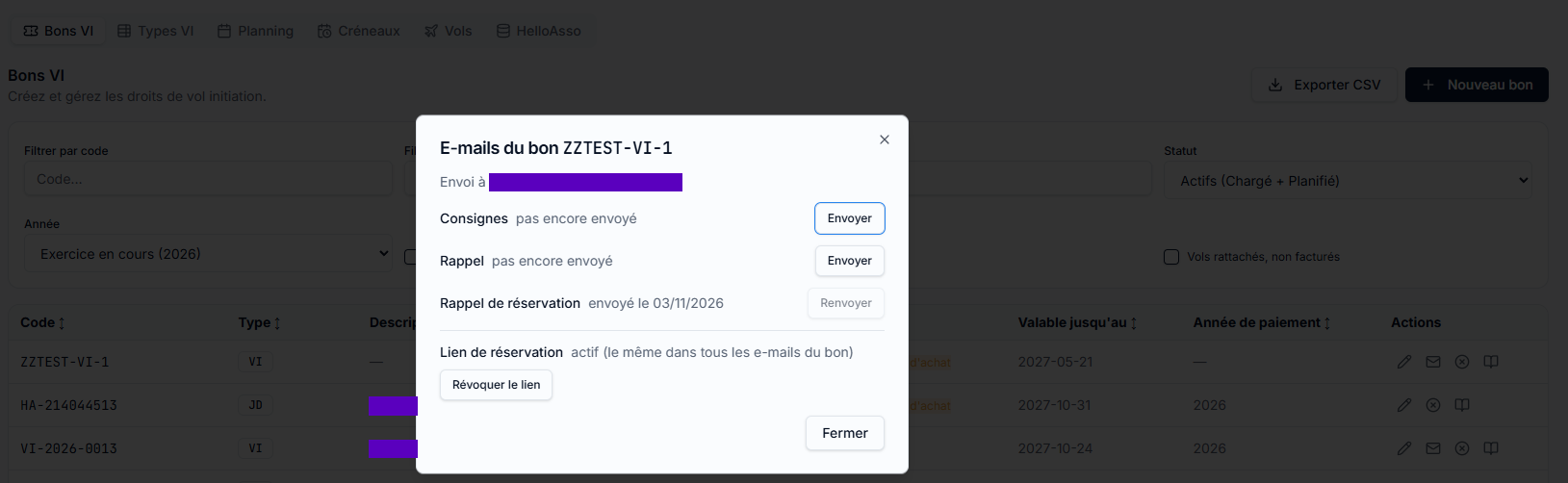
Lost link or wrong address? In the same window, the Booking link area shows whether a link is active; Revoke the link (with confirmation). The old link stops working immediately; the place already booked is kept; the next e-mail contains a new link.
When nothing is sent
- The voucher has no e-mail address (normal for a voucher sold on site or a group voucher).
- The type is on No e-mail, or its text is empty.
- The reminder is requested without a flight date, or the voucher is generic, completed, cancelled or expired.
- The reminder was already sent for that date.
- The club's mail server is not configured (Administration › mail).
- Outside production, only allow-listed addresses receive e-mails.
Checklist before the season
- Accounts
419100,7067,70692,401,6169and analytical921/902filled in for each type - Federal insurance third party chosen, insurance amount entered
- Instructions on Automatic, with
[lien de réservation] - Reminder on Automatic, written as a confirmation
- Booking reminder on Manual, with the link
- Preview read, test sent to your own address
- Club name, phone, e-mail and privacy policy filled in the general settings